Arrive vs. a VPN: How They Differ
A VPN is built for privacy. Arrive is built to get your game packets to the match with less delay. Here’s where they overlap and where they don’t.
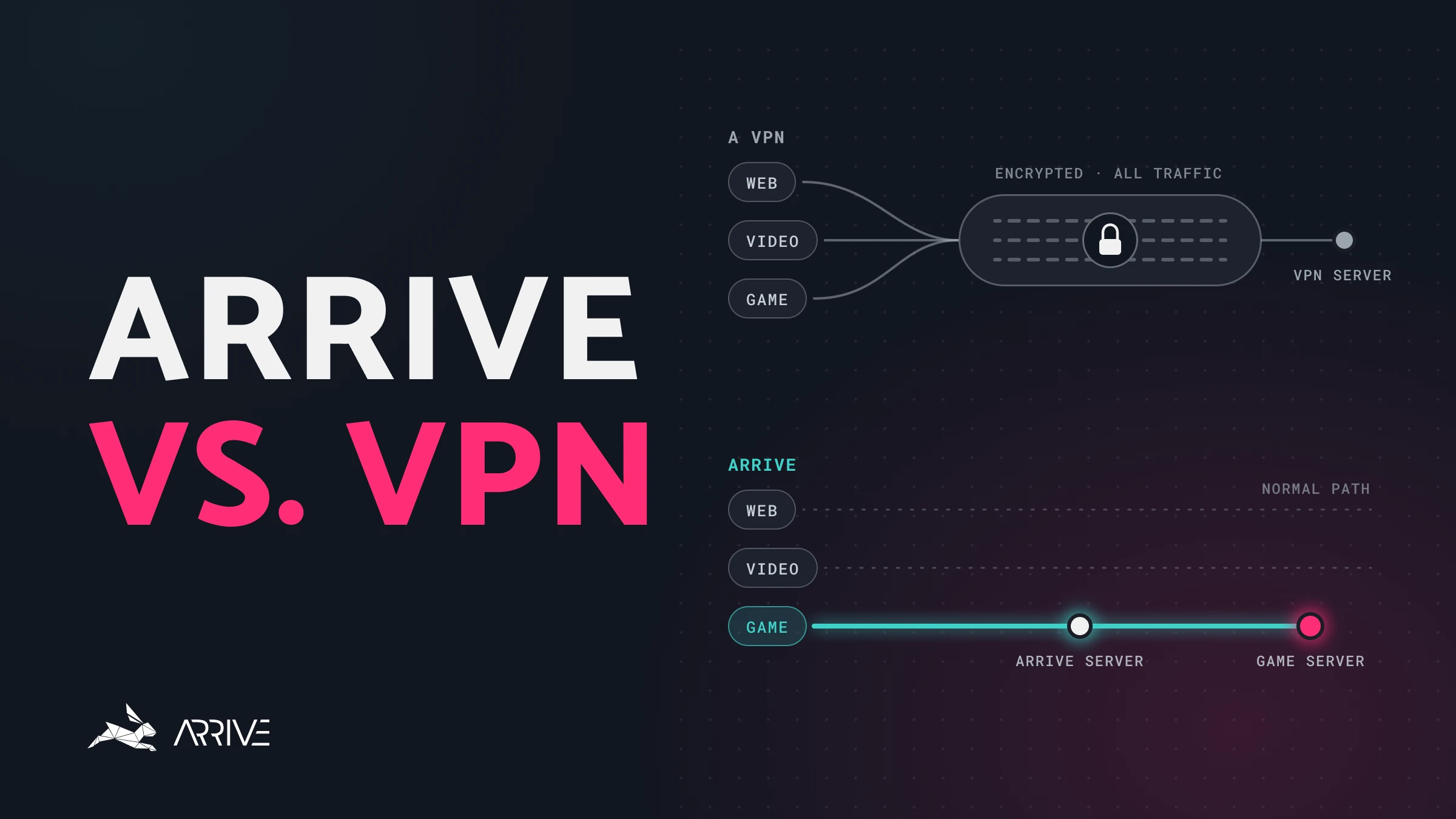
No, Arrive is not a VPN (virtual private network). Both send your traffic through a server, but after that they are built for different jobs. A VPN is built to encrypt and relocate everything you do online. Arrive is built to get your game packets to the match with less delay.
What does a VPN do?
A typical VPN does three jobs. It encrypts your traffic. It gives that traffic a new exit point, so websites and game servers see the VPN’s location. And it can change your lag, sometimes for the better and often for the worse.
Arrive shares the second job, for game traffic, and is built around the third. The first is a difference worth being clear about.
Is Arrive encrypted like a VPN?
On the normal internet, a lot of traffic is already encrypted, and some of it is not. A VPN encrypts all of it. Your packets go through an encrypted tunnel to the VPN server, and your internet provider only sees a stream of traffic to that server. They can no longer tell that you opened Google, Amazon, or a game. That privacy is the product: you are trusting the VPN company with the activity your provider can no longer see.
Arrive does not do this today. We tunnel game traffic, and we do not add our own encryption on top. Game traffic is, in most cases, already encrypted by the game companies. General browsing is where the extra privacy of a full tunnel matters, and that is not the traffic we carry.
With a VPN
- GameVPN server
- BrowserVPN server
- Other appsVPN server
Everything goes through an encrypted tunnel and leaves from the VPN server.
With Arrive
- GameArrive server
- BrowserNormal path
- Other appsNormal path
Only game traffic goes through Arrive. Everything else stays on its normal path.
We may add our own encryption in the future, if we can do it without adding overhead, and if there is a benefit. For now, leaving that layer off is a performance choice.
Will Arrive change my game region?
Say you live in Atlanta. A game server sees a connection from Atlanta, because that is where you are. With a VPN, it sees the VPN server instead. Pick a server in Paris, and the game, Google, and everyone else on that path see Paris. Many games will then try to place you on a server near Paris, because they are trying to give you low ping and they believe you are there.
Arrive works the same way here. The game sees the Arrive server you selected, or the one we selected for you. We cannot send you out of Paris and still make the game think you are in Atlanta. That is just how an exit point works, and in practice it rarely changes anything you care about.
Some games do use that location for matchmaking: if they see Paris, they put you in a European queue. Others ignore it and use the region on your account. Valorant is one of those. If your account is set to North America, Valorant keeps showing North American servers such as Dallas and Chicago, even if you live in Europe or send your traffic through an Arrive server in Paris.
Can a VPN lower your ping?
A lot of people picture the internet as a system that automatically picks the fastest route. It tries, loosely, and often lands on a route that is cheap or convenient for the networks in the middle. Your provider only has the paths it has built or bought. Between your house and the game server, packets pass through routers. Distance costs time, and a busy router often costs more.
VPNs sometimes land you on a cleaner path by accident, as a side effect of a product built for privacy. For Arrive, finding that cleaner path is the product. A route through our servers can be physically longer and still faster, because it skips a congested hop. In one simplified case, that takes a path from 80 milliseconds (ms) down to 46 ms. We go through that example, and the cases where Arrive cannot help, in How Arrive Reduces Your Ping.
It will not help every connection. If your provider’s route to the game is already short and quiet, there is nothing useful for us to change.
Which network tools does Arrive use on Windows?
Players sometimes look up the pieces of software on their PC. These are the ones that handle Arrive’s packets, from the Arrive app down to Windows itself. We use them because they are the straightforward way to steer game traffic on Windows.
- ArriveAsks for the packets that match a filter: your game traffic
- WinDivertFree, open-source library that captures, filters and reinjects packets
- Windows Filtering PlatformBuilt into Windows. The Windows firewall is built on it
WinDivert
WinDivert is the library Arrive uses to ask Windows for the game packets that match a filter. It is a free, open-source packet tool for Windows, written by basil and published at github.com/basil00/WinDivert. Firewalls, tunnels, traffic tools, and apps like Arrive use it to capture, filter, and reinject packets.
Writing our own kernel driver for the Windows Filtering Platform would mean maintaining a sensitive piece of software for a problem Windows and WinDivert already solve. WinDivert is the maintained library that does it, and we use it to route gaming traffic to Arrive servers.
Windows Filtering Platform
Underneath WinDivert is a system Windows already includes for inspecting network traffic and deciding what happens to it, called the Windows Filtering Platform. The Windows firewall is built on it, and so are many security and networking apps. We need Windows to hand us the game packets so we can send them toward our servers, and to leave everything else on its normal path. The operating system already knows how to do that job.
OpenVPN
OpenVPN is an open-source way to build an encrypted tunnel. Many VPN apps offer it as a connection mode, because it is widely supported and it does the privacy job well. But encrypting and decrypting every packet adds work on your PC and on the server, and OpenVPN was not built to keep that overhead as small as possible. A VPN user who wants the lowest latency often switches to a newer protocol the same app offers. For a game, those extra milliseconds are the thing you came to remove.
Arrive does not use OpenVPN. We are not building a private tunnel for all of your internet traffic. We select game traffic and send it on a route we operate, using the Windows tools above.
Should you use a VPN or Arrive for gaming?
Use a VPN for privacy and Arrive for ping, but not both at once while you play: a VPN can get in the way of Arrive finding the best route.
If your ping is high or spiky after you are on a wired connection and on the closest game server, the remaining cause is often the route between your provider and the game. That route is the part Arrive works on.
Arrive is a free Windows app that sends your game traffic through our own network, and it covers North America and Europe (in alpha). Pick an Arrive server near your game server and compare your ping with it off and on. Routes change from night to night, so the quickest way to find out what it does for your connection is to try it.