How Arrive Reduces Your Ping
Where the milliseconds go between your PC and the game server, and why the shortest line on the map isn’t always the fastest trip.
Arrive reduces your ping by moving your game traffic onto a faster route: around a congested router, or onto a long-distance path your internet provider does not have. Where your provider already has the fast path, there is nothing for Arrive to improve, and we cover that case too.
Why is my ping high when my internet is fast?
Ping, also called round-trip time (RTT), is the time your game packets spend on the path between your PC and the game server and back. Two different things inflate that time. A router in the middle can be busy, so packets wait. Or the fast road between those two cities was never a road your internet provider could put you on.
The numbers below are simplified, so you can see where the time goes. Real routes have more hops, but the shape of the problem is the same.
Can a longer route have lower ping?
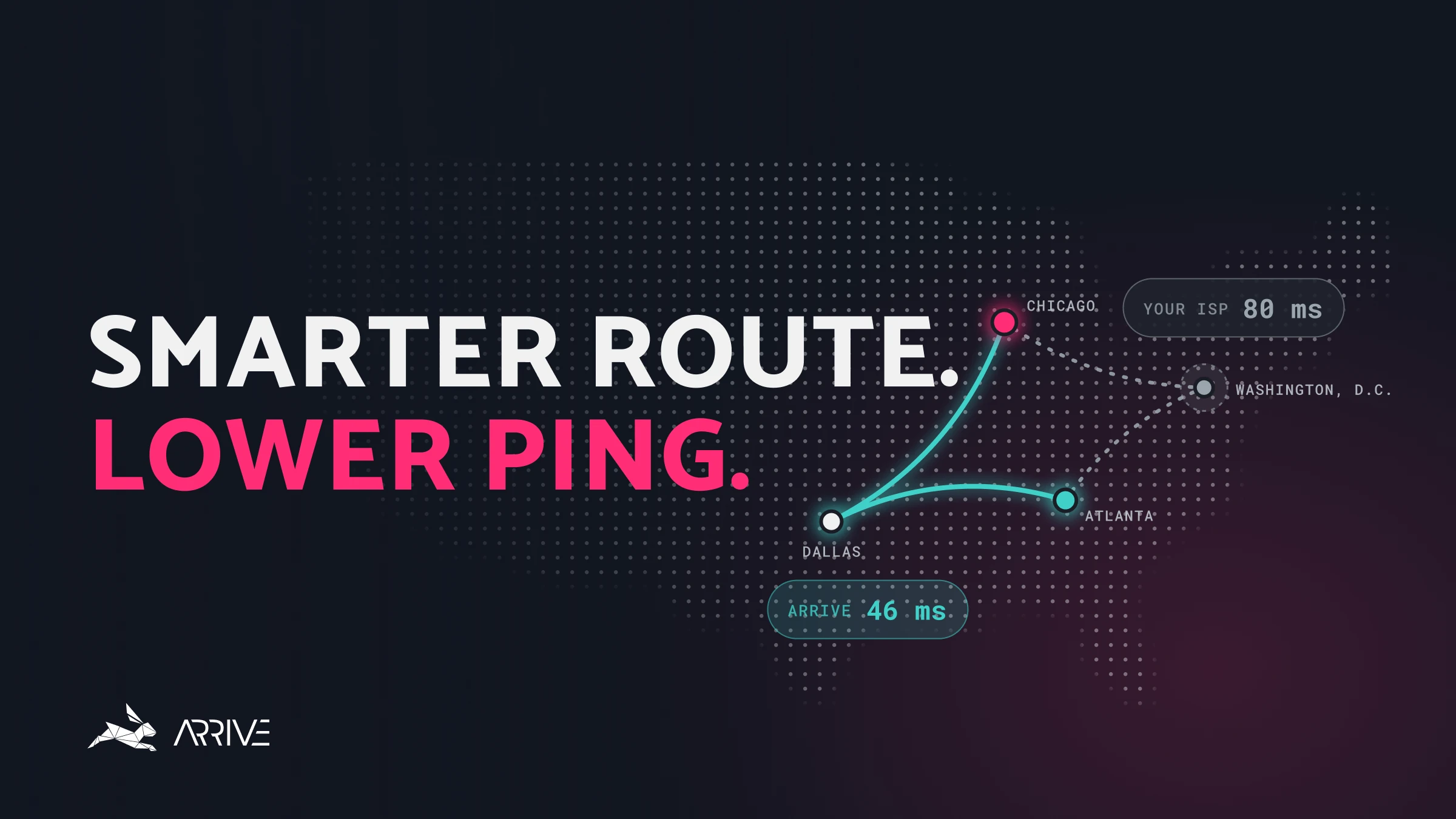
You live in Atlanta. The game server is in Chicago. Your provider’s route passes through one congested router in Washington, D.C. The distance is fine, since Washington is a reasonable place for that traffic to pass through. The delay is the router, which is also carrying everyone else’s traffic and adds 40 milliseconds (ms) of waiting.
Arrive can move the game traffic onto a different route, through a Dallas server we keep uncongested.
-
Your provider’s route80ms
- Atlanta → Washington, D.C. 20 ms
- Time on the congested router 40 ms
- Washington, D.C. → Chicago 20 ms
-
Through Arrive’s Dallas server46ms
- Atlanta → Dallas 25 ms
- Time on the Arrive server 1 ms
- Dallas → Chicago 20 ms
Dallas is physically longer: the fiber portion goes from 40 ms to 45 ms, so the extra distance costs 5 ms. But skipping the congested router saves 39 ms, since the Arrive server adds only 1 ms. The net change is 34 ms, from 80 ms down to 46 ms. A longer line on the map was the faster trip, because the time was sitting in a queue, not in the fiber.
Does my internet provider use the fastest route?
A common picture of the internet is that your connection can take any route, and that some system is already choosing the fastest one. What you have is the small set of long-distance routes your provider has actually bought.
Those long-distance routes are called transit. A handful of large transit networks sell passage between cities. Your internet provider buys some of them, and the network that hosts the game server buys some too. Neither side is shopping from the full list. A very rough approximation is that an internet service provider (ISP) has at most about 10% of the long-haul paths the major transit networks offer. The rest are invisible to your connection, so a faster path can exist and still be one your provider has no way to use.
That is a separate problem from the busy router. There, the path existed and was congested. Here, the better path was never on the menu.
How Arrive finds a faster route
Part of how we reduce ping is by assembling a wider mix of those transit paths than a single home provider typically buys. Game traffic enters an Arrive datacenter, and it can leave on a route your ISP does not have. Where that route is shorter, quieter, or both, your ping drops.
We do not have every path either. The difference is that adding them is the business. A home ISP’s business is selling you internet. Carrying your game traffic from Las Vegas to one particular Los Angeles building, on the best fiber available that week, is a small detail for them and the whole product for us.
That makes Arrive sound a little like a VPN (virtual private network), but it is not one. For how the two differ, and the Windows tools we use to steer the traffic, see Arrive vs. a VPN: How They Differ.
Why Arrive lowers ping for some players and not others
This is also one reason Arrive cannot improve ping for everyone. Take a player in Las Vegas on a Valorant server in Los Angeles. Those cities are close, and plenty of networks already have a direct route down that corridor. If your ISP has it, you are at about 20 ms, and Arrive, on that same route or one very like it, lands at about 19 to 22 ms. There is nothing meaningful to improve.
Now change providers. This one buys its transit for that traffic in Salt Lake City, a major meeting point for networks in the western U.S. So the packets go north to Salt Lake first, then come back southwest to Los Angeles: the wrong direction. Phoenix or Denver plays the same role for other providers. Arrive still has the direct path, so the result flips, and the ISP’s path spends the extra time on a detour our network does not have to take.
-
An ISP with the direct route20ms
- Las Vegas → Los Angeles 20 ms
-
An ISP that goes via Salt Lake City45ms
- Las Vegas → Salt Lake City 20 ms
- Salt Lake City → Los Angeles 25 ms
-
Arrive’s direct Los Angeles path19–22ms
- Las Vegas → Los Angeles 19–22 ms
Can Arrive make my ping worse?
Yes. When we do not hold the route your ISP holds, Arrive can be slower. Sometimes that is only a few milliseconds, and sometimes the gap is large. If that happens, try Arrive’s other servers first, and turn Arrive off for that game if none of them helps.
Why does my ISP send traffic the long way?
The Salt Lake detour is not a broken route. The ISP chose it, and the software that carries the traffic out is doing what it was set to do.
BGP does not choose the lowest ping
The main routing protocol on the internet is BGP, the Border Gateway Protocol. When networks connect, BGP is how they announce which destinations they can reach, and how a path gets selected.
BGP does not measure milliseconds and then sort. What it usually prefers is a smaller hop count: fewer networks from you to the destination. A lot of the time that lines up with lower ping, because a shorter chain of networks is often a shorter trip. A minority of the time, the smaller hop count is the long way around, and that still comes up often enough to matter in a game.
Take the Las Vegas example. Path A passes through 2 networks, and one of those hops is the long haul up to Salt Lake City and back down to Los Angeles: 45 ms. Path B passes through 5 networks, each a short stretch of fiber on the direct road: 20 ms.
-
Path A · 2 networksBGP’s pick45ms
-
Path B · 5 networksLower ping20ms
The route through more networks was the efficient one, and it was not the route the protocol picked. This is part of where Arrive comes in. We measure which routes actually have the lower ping, and we send the game onto those. Hop count is the hint the internet already used. The milliseconds are what we check.
ISP networks are built for video
ISPs have investors and a margin to hit. A direct, quiet path to every city a match might land in is real capacity, and someone has to pay for it. Your bill does not go up because your ping to one game server dropped, so an ISP that bought the highest-performance route on every path would have to charge far more for home internet. A competitor that skips those routes can charge less and still run video without complaints.
And video is what the capacity is sized for. A stream can use 10 times the bandwidth of a game, and in some cases 100 times. That is on the order of 90% of what an ISP spends to move data, so it is what they have to prioritize to stay in business. Games are a small share of the bill. So the ISP signs with the transit provider whose path is cheaper, even when it goes through a city off the direct line, and its engineers tell BGP to prefer that provider. The long route is the route the contract selected.
A movie never notices. If playback starts 50 milliseconds later, the app buffers the upcoming stretch and the picture does not stop. A game cannot buffer what has not happened yet. The server has to hear that you moved or fired, and the reply has to come back, inside the same few milliseconds a video would have absorbed. Voice and other real-time communication are in the same position.
Why ping changes from one game server to the next
Run the comparison per server, not once for your whole account. In Valorant it is very common for your provider to already have a strong route to one city and a poor route to another. For example, one player’s Chicago server might go from 45 ms toward 20 ms while their Los Angeles server stays where it is, because that route was already good.
-
ChicagoWe have a better path here
45 → ~20ms
-
Los AngelesTheir route was already good
No change
For some players we do not have a better path to any server they play, and Arrive will not lower their ping until we add one. One test on one server does not describe the rest of the region list.
The network keeps growing
We keep adding datacenters and routes, so a test you run today measures the paths we have today. We expect to add a large number of them over the next five years, and a path we could not offer on your first test may be one we have bought since.
We are also in conversation with game companies and network providers about building routes that are not offered on the public internet at all. That is a plan with a cost attached. Nothing in Arrive today comes from it.
How to test whether Arrive lowers your ping
Play with Arrive off, then on, on the server you actually play, and compare the in-game ping. If it drops, keep it on. If not, try Arrive’s other servers, and turn it off for that game if none of them helps. Then check back in about six months.
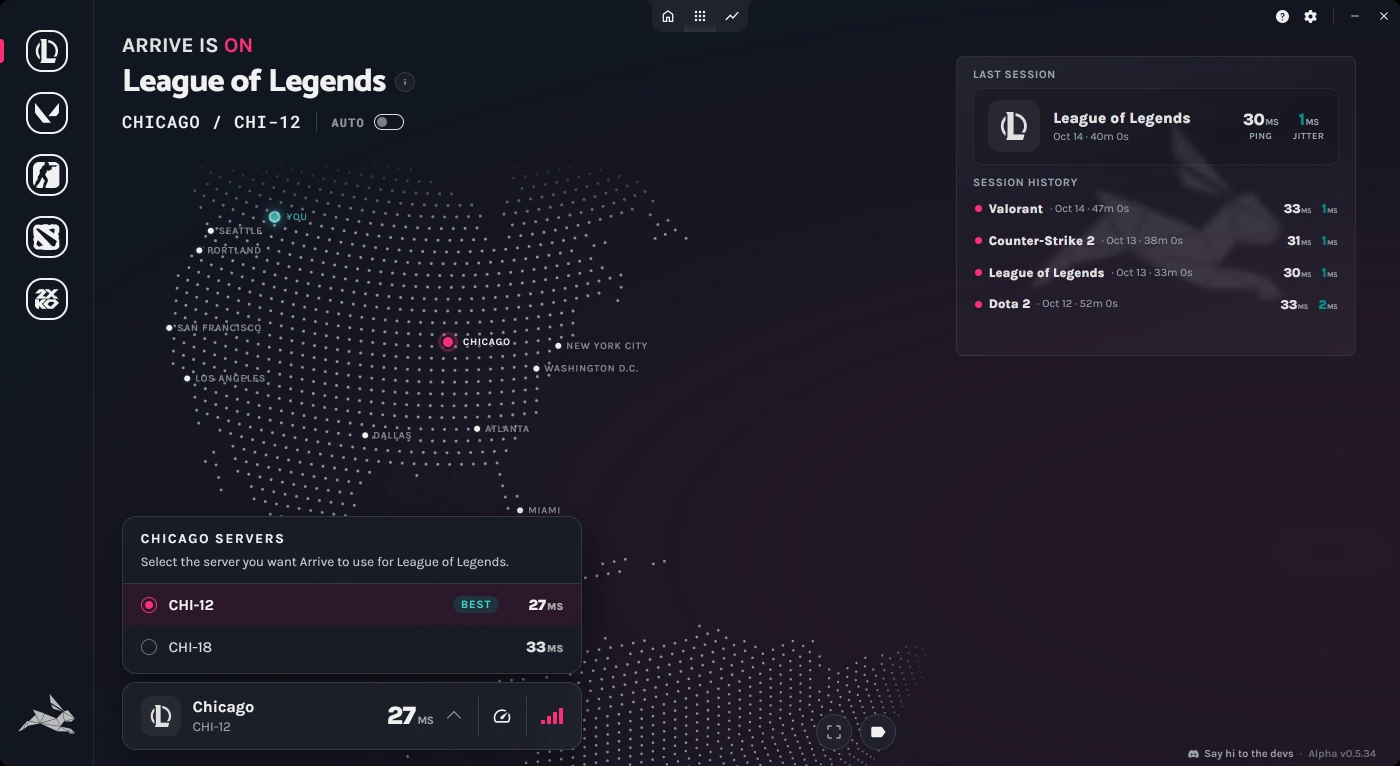
Arrive is a free Windows app that sends your game traffic through our own network, and it covers North America and Europe (in alpha). The quickest way to find out what it does for your connection is to try it.